


What Is an Email Workflow?
An email workflow is a succession of emails that you trigger to send automatically based on predetermined criteria, such as a contact action, preference, or other custom data. Each email workflow should contain mini conversion goals (e.g., links to click, embedded videos to watch) that help guide the customer through the journey from initial contact and purchase to retention and loyalty.
Marketers promoting an ecommerce business and companies with an online presence that have contact lists to manage, new customers to onboard, and leads to nurture through every stage of the customer’s journey typically design and use email workflows.
Types of Content to Use in an Email Workflow
The forms of content you use in your email marketing workflow depend on the goals of each piece of content and the stage of the customer journey. For instance, a user that is new to your brand won’t benefit from content that immediately pressures them to make a purchase, just as a loyal customer won’t benefit from content that introduces them to your brand. Taking the needs of each contact into account enables you to communicate the most helpful and relevant content in order to build a relationship with and nurture each lead.
Listed below are common types of email content to incorporate into your workflow:
- Informational
- Educational, such as product demos and tutorials
- Promotional
- Newsletters
- Frequently asked questions (FAQs)
- Press releases
- Product feature updates
- Announcements, such as events and webinars
- Special sales and offers
- Popular articles and blog post
Developing an Email Workflow
Email workflows can be dynamic or linear, and your email campaign strategy will determine which type of workflow, or combination of workflows, to launch. The two main types of automated email workflows are drip campaigns and nurture campaigns.
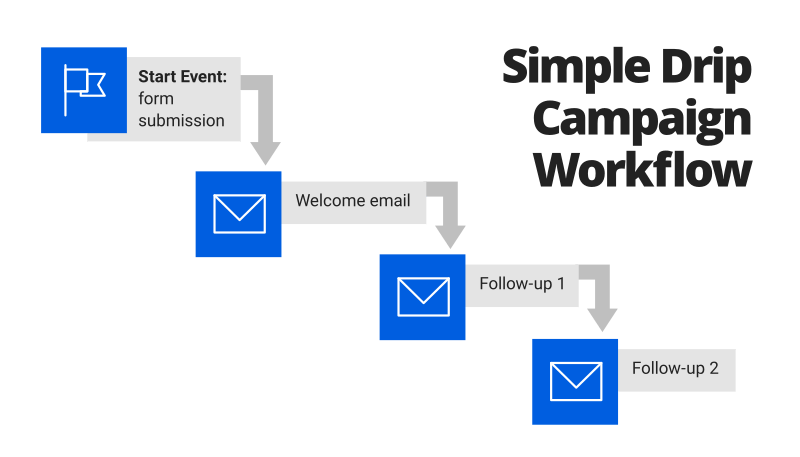
A drip campaign is an example of a linear, automated email workflow that sends content to a segmented group of contacts on a set schedule and contains little to no marketing personalization. This type of workflow can be useful for outreach campaigns that introduce new leads to your brand at a slower pace; you can trigger this type of workflow to send an email to a contact that you’ve added to your lead database.
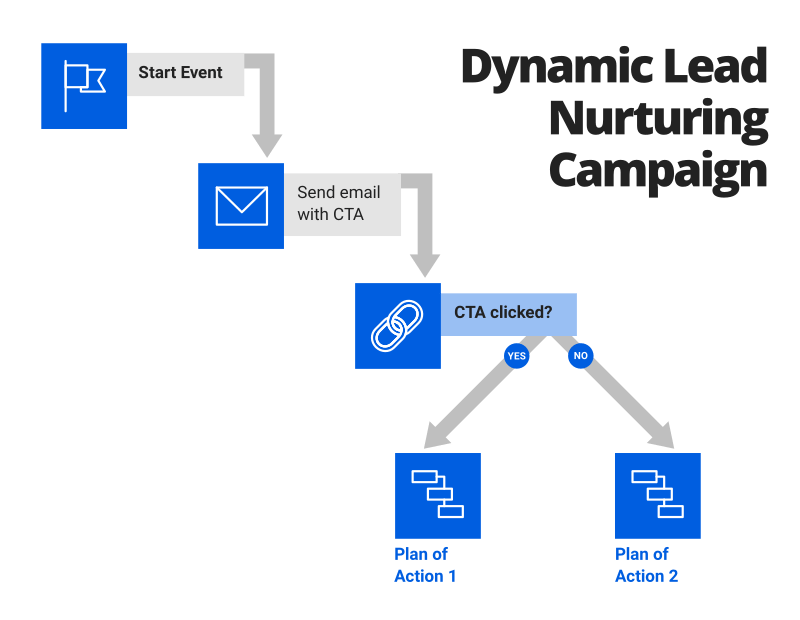
An automated nurture campaign sends targeted content on a more strategized schedule, appealing to the relevant interests and preferences of a contact at a given stage of the contact’s journey. You can trigger this dynamic type of workflow based on a web form submission, content download, or other specified user action. In some cases, a marketer will launch a campaign drip that includes a variety of links to its most popular posts, providing a contact with a number of choices. How that contact interacts with the email content will provide valuable insight into their interests and can be helpful in determining which content types to use for follow-up purposes.
Common Challenges of an Automation Platform
Here are the most common challenges associated with automation platforms:
- Complexity of automation software
- Lack of team skills and knowledge to effectively use the system and analyze results
- Information silos between teams
- Lack of ability to integrate with other systems, such as a CRM database
Key Features of an Effective Automation Platform
Here are the key features to drive results:
- Ability to set workflow triggers based on specific conditions or user actions, also known as start events
- Automation of repetitive marketing tasks, including posting content across multiple online channels
- Personalization or communication that is relevant to user behavior and preferences
- Lead action tracking, including abandoned carts and conversions
- Visualization of a lead’s current location at each stage of the lifecycle
- Lead tagging capabilities
- Lead scoring capabilities
- A/B testing capabilities
- Automation of customized message sending, i.e., lead nurturing (getting the right message to the right user at the right time)
- Email workflow management
- Analytics or performance measurement tool
New posts in your inbox
Why Does My Business Need an Automated Email Workflow?
According to Campaign Monitor, there are over 3.7 billion email users in the world, and that number is steadily growing. The organization also reports that 72% of users prefer to receive promotional content via email; personalized emails (i.e., emails containing a contact’s first name as well as content relevant to their preferences) produce transaction rates six times higher than those of generic emails. If you don’t have the time and resources available to research each contact and manually send them a personalized email, automated email workflows are an efficient solution.
Do I Need to Implement an Automated Email Workflow?
If you can identify with the common business challenges listed below, then an automated email workflow might help you overcome them:
- Being able to effectively leverage all the customer data that’s available
- Having a content strategy with the agility to adjust to user needs in a timely manner
- Having the resources to manage a growing number of leads with a variety of needs
- Getting users to open emails
- Getting users to click links within emails
In addition to overcoming business obstacles, an automated email workflow provides the following benefits:
- Allowing your team to put more focus on other important tasks
- Enabling connection and engagement with current contacts
- Offering lead segmentation
- Facilitating the customer journey of each contact while catering to their needs at each stage
- Reaching contacts with the relevant content at the right time
- Encouraging contact action (i.e., purchasing, upsells, and brand evangelism)
- Qualifying a lead and guiding them to conversion
- Supporting customer retention
- Boosting marketing performance in the sales pipeline
- Offering personalized marketing communication
- Improving the quality of leads
- Building relationships with customers
- Creating a positive user experience
- Improving email open rates
- Decreasing spam complaints and customer churn
- Growing the lead database
- Increasing customer lifetime value
- Accurately measuring email marketing ROI
- Reducing customer churn
Email marketing automation workflows give your business more control while minimizing human error and positively impacting your bottom line.
How to Build and Manage an Automated Email Workflow
The key to building out and managing an automated email workflow is having a strong campaign content strategy in place. Learn about the five essential steps to a successful content marketing plan, including free content marketing templates to get you started.
Once you establish your content plan, take the following steps to build and manage your automated email workflow:
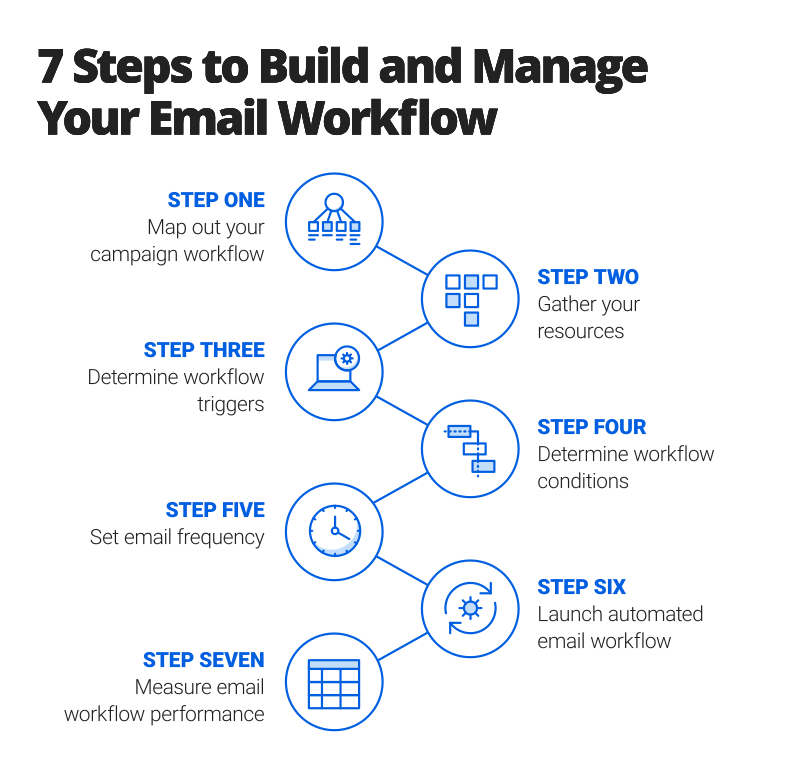
- Map Out Your Campaign Workflow: Use a flowchart to map out each email campaign workflow from start to finish. Get a jumpstart by using the free, customizable workflow templates provided at the bottom of this page.
- Gather Your Resources: Compile all the assets needed for your workflow, including forms, lists, CTAs, landing pages, and all the key types of content necessary to guide your lead through all the touch points. The forms of content you use within a workflow should work in accordance with the goal(s) of the workflow and where the customer is in their journey. Here are some examples of content types to incorporate:
- Informational
- Educational/training
- Blog posts/articles
- Press releases
- Announcements
- Sales pitches
- Frequently asked questions (FAQs)
- Determine Workflow Triggers: Decide what event will take place in order to set your automated workflow in motion. Examples of workflow triggers include the following:
- New contact added to a list (for a blog or newsletter)
- Form submissions
- Clicks
- Content downloads
- Page visits
- Brand interaction frequency (or no interaction after a set amount of time)
- Email opens
- Purchases
- Opt-ins (e.g., gated content)
- Transaction-type events (e.g., mini conversions)
- Contact tags, which are based on specific user actions
- Sales and support team contact
- Milestones (e.g., birthdays and anniversaries)
- Custom conditions
- Determine Workflow Conditions: Set conditions and utilize lead tags to help filter and segment your leads based on custom criteria. For example, you can add a lead to a designated workflow if they have viewed a certain page. You can also remove a lead from one workflow and add them to another based on purchase history.
- Set Email Frequency: Establish how far you want to space out your emails. This will vary based on the type of workflow. For instance, an email workflow for a new user that you add to a list will differ from a lead that has signed up for a free trial. Getting this step right is crucial — you want to be helpful and staying fresh in the lead’s mind without overwhelming them.
- Launch Automated Email Workflow: Now it’s time to set the plan in motion. A set-it-and-forget-it strategy is not conducive to a successful campaign workflow. Measure results and conduct tests to see what’s working and what’s working better. Strive for continuous improvement.
- Measure Email Workflow Performance: Measure the effectiveness of your automated workflows. Try out these free dashboard templates and learn how to gain high project visibility and track real-time results at a glance. Key performance data to capture includes the following:
- Emails sent
- Email open rates
- Click-through rates
- Conversion rates
- Subscribe/unsubscribe rates
- Average order value
- Retention rates
- Total contacts enrolled in workflow
- Active contacts in workflow
- Total contacts who completed the workflow
22 Examples of Email Marketing Workflows: Simple and Advanced
The type of email marketing workflow you develop for a segmented group of leads will depend on the main goal of the workflow. Understanding the pain points of your audience, offering relevant solutions, and nurturing each lead through the customer journey to conversion should serve as the cornerstone to each email workflow.
Subscriber Welcome Workflow
According to the site Email Monks, welcome emails have an average of four times the open rate and five times the click-through rate, compared to standard email marketing campaigns. When a new subscriber is excited to learn more about your business, use that opportunity to make a great first impression and showcase what your brand is all about.
Workflow triggers: Form submission, content download, contact added to a list
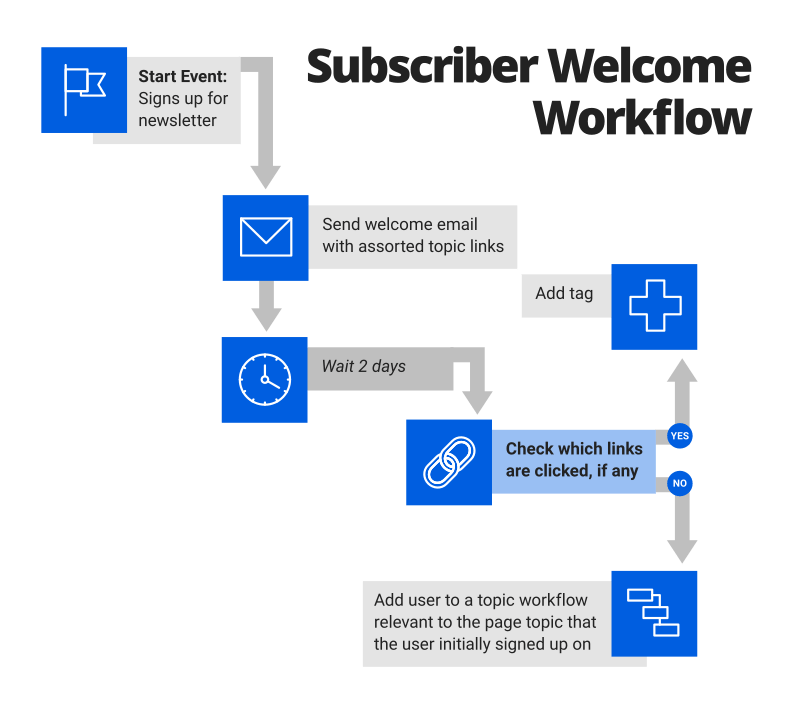
In a welcome campaign, you want to introduce your brand and present your utility. Since the new contact is unfamiliar with your brand, point them in the direction of your social channels and learning resources (e.g., blogs, webinars, etc.) to help them get the most out of their experience. You can also gather information from your lead to start building their contact profile by providing a quick survey with topics to learn more about or links to high-performing blog posts in order to get a feel for user interests.
Gated Content or Opt-Ins Workflow
An opt-in workflow is initiated when a new lead exchanges their contact information for a high-quality content pillar, or a lead magnet. Keep in mind that if leads get hung up at the start event of this workflow, the amount of information you are requesting may be driving them away. Split-testing the number of mandatory fields or the type of information required will give you valuable insight into what could be deterring prospects.
Workflow triggers: Dedicated landing page, form submission, content download
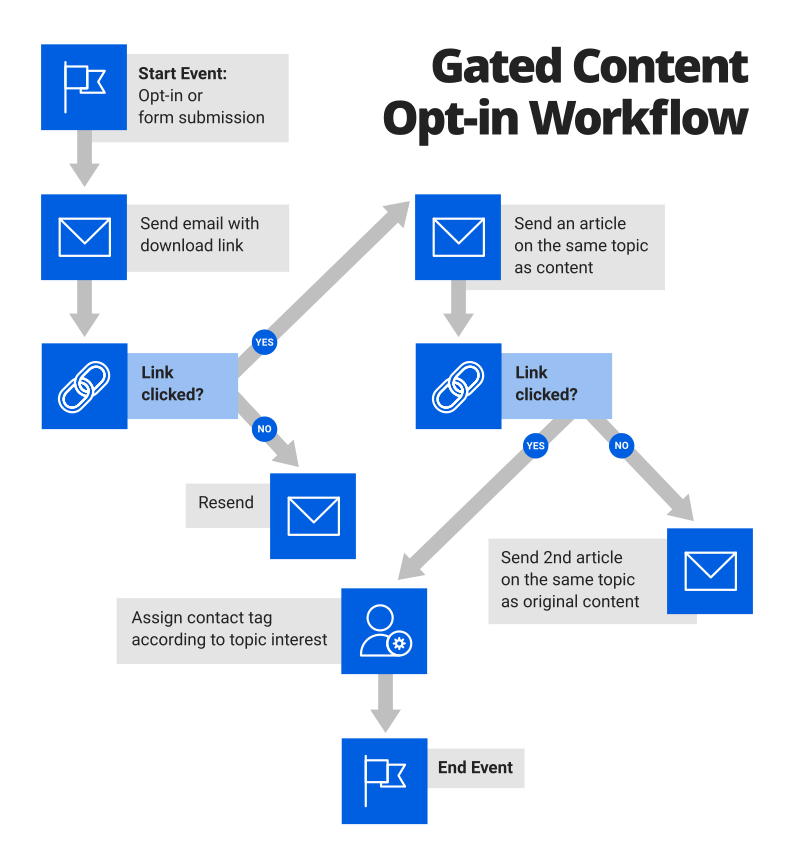
With an opt-in campaign, be sure to follow up in a timely manner with the content download link that the lead opted to receive. Similar to a welcome campaign, an opt-in campaign indicates that contacts are expecting to hear from you and are eager to consume your content. Once the workflow has reached its end event, you can add the lead to another workflow that is relevant to the content they opted to receive.
Customer Onboarding Workflow
In business, it is more expensive to recruit new customers than to retain existing ones. A customer onboarding workflow leverages newly acquired customers to ensure they get the most out of their experience with your brand. Verify that your customer onboarding process employs these expert-proven tips and best practices by using this advanced guide to customer onboarding.
Workflow triggers: Purchase, transaction-type event
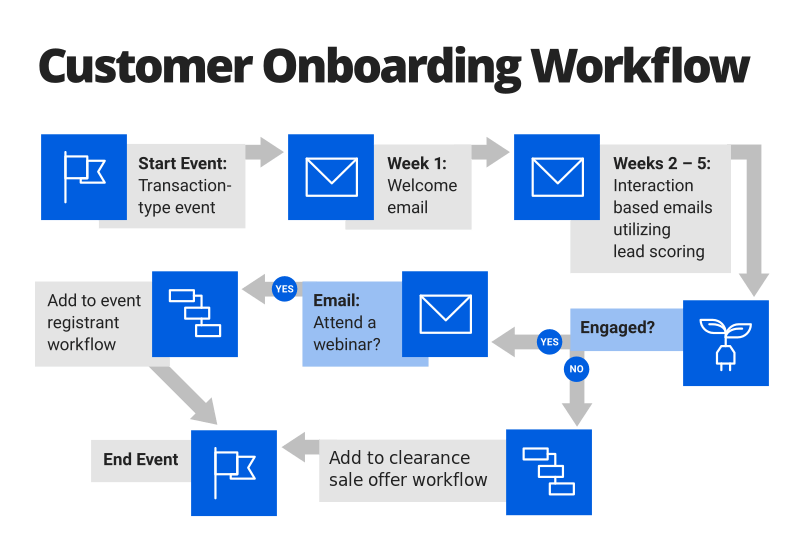
You should kick off your onboarding workflow with an introductory email. This email should lay the groundwork for a lasting mutual relationship by setting user expectations regarding customer service and letting the customer know how they will benefit from using your products and services. Your workflow should also launch follow-up emails that offer product tutorials, demos, and other helpful tips to ensure customers are benefiting from all of the features your product has to offer.
Special Occasion Workflow
Foster your relationship with a lead by connecting with them on milestone dates. Sending an email to subscribers on their birthday, an anniversary, a holiday, or any other key date that is located in a lead’s profile or added as a lead tag is an effective way to engage with your contact on a more personal level.
Workflow trigger: Milestone date
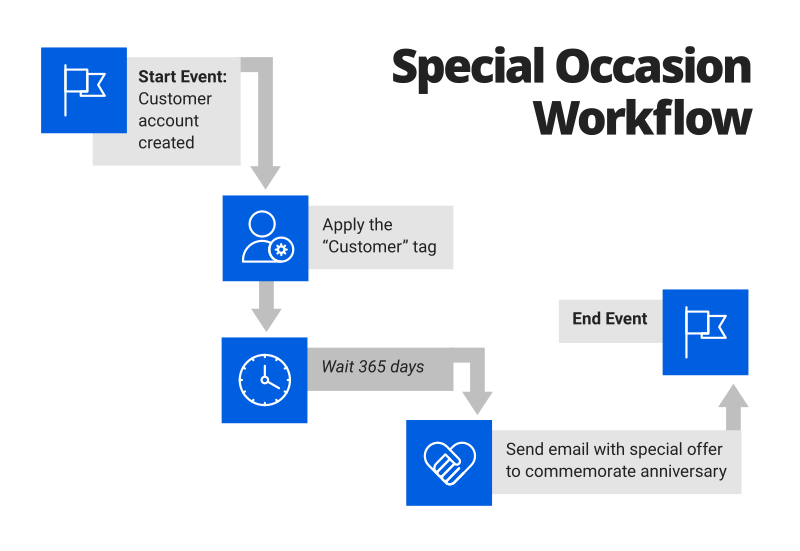
A special occasion workflow is a great way to engage with your leads and make them feel remembered, while also giving you an opportunity to offer special discounts and incentives to encourage a purchase.
Event Registrants Workflow (Pre and Post-Event)
Having the ability to engage with your leads in person is a powerful way to gather valuable insight from attendees and build lasting relationships. You can use a marketing event workflow to engage with event registrants before, during, and following an event in order to fuel a positive event experience that encourages leads to convert.
Workflow triggers: Form submission, event date
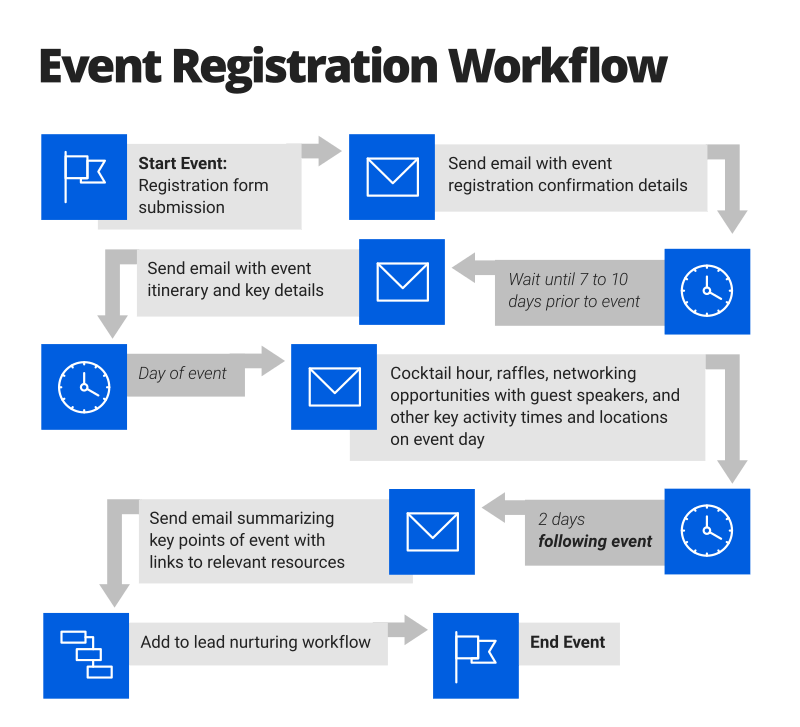
Launch this workflow a week or so prior to the event to prepare registrants for a webinar, conference, or tradeshow. The timing of emails spaced throughout the workflow should correspond with the key dates of the event. For example, for a multiple-day event, you can schedule an email to inform attendees about raffles, guest speakers, or any other planned activities, and include locations. In the days following an event, schedule an email to summarize the event’s key points, including links to additional resources that encourage your lead to take next steps. Prior to building your workflow, you will want a clear event plan with a solid marketing strategy.
Free Trial Sign-Up Workflow
Before setting up a free trial email workflow, you should take into account how you will segment your users (e.g., by industry, size of company, etc.), what internal team will own the customer journey (e.g., sales, marketing, etc.), and what the touch points along the journey will be.
Workflow triggers: Form submission
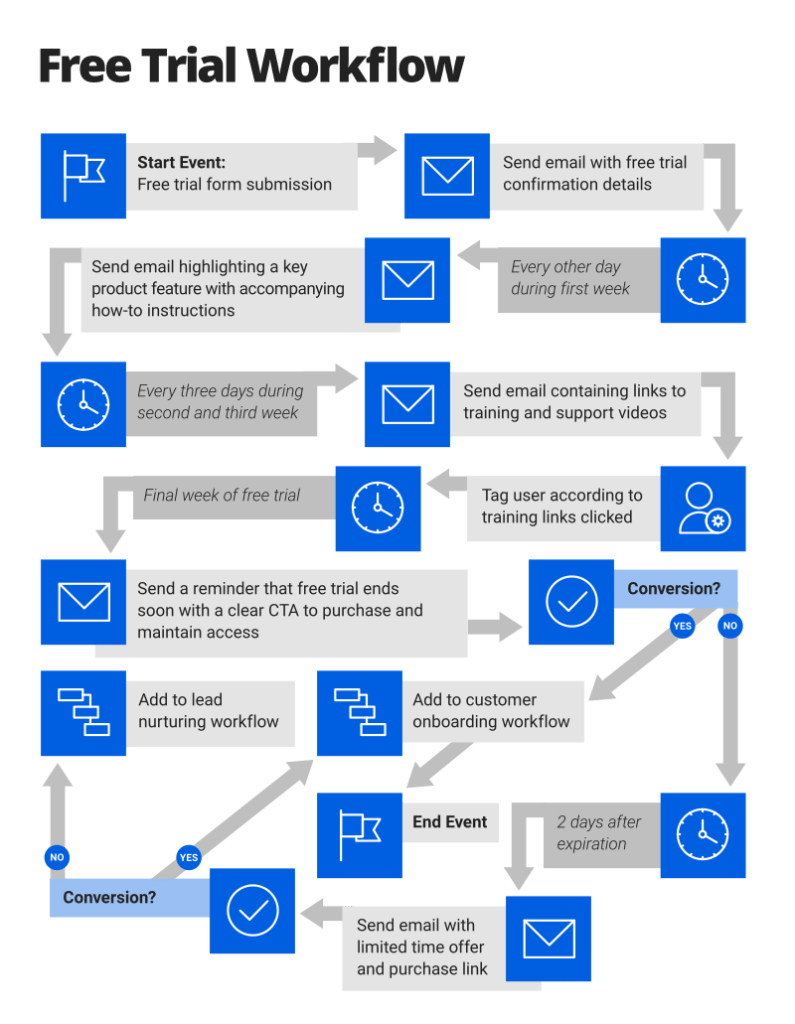
A free trial sign-up workflow should launch a confirmation email directly after a contact signs up for a free trial. This email should include a description of what the contact can expect from your product. Similar to customer onboarding, your workflow should be infused with product demos (educational videos that highlight the key features of your product). In the days leading up to trial expiration, the workflow should remind the user to sign up in order to keep taking advantage of the benefits of the product.
Expired Subscription or Subscription Renewal Workflow
A subscription renewal workflow is essential for any business that operates with a recurring revenue business model. According to the site Small Biz Trends, 68 percent of customers stop doing business with a company because they perceive the company as being indifferent toward them. Show your customers they are more than just a number by being intentional and proactive with the message you convey within your workflow.
Workflow triggers: Customer renewal date
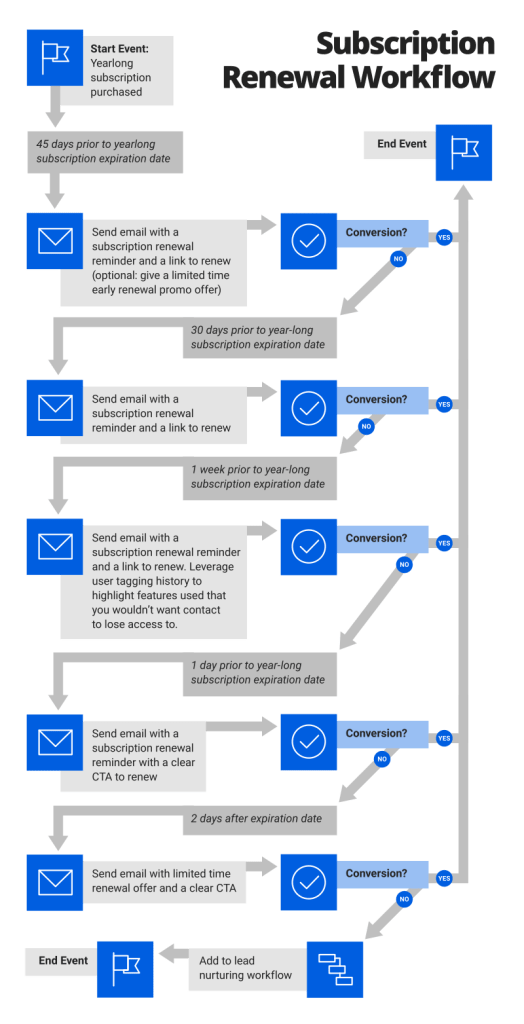
A subscription renewal workflow should launch during the month, week, and days prior to the impending expiration date. The series of emails should communicate a reminder to the customer that, in order to maintain uninterrupted access, they need to renew their subscription by a set date. During this time, you should leverage the existing information you’ve collected from the lead. Use the lead tags and the conditions the customer meets to highlight the features they use and to emphasize the benefits you don’t want them to miss out on.
Topic Workflow
Launch a topic workflow to contacts that already exist in your database when they have downloaded content or visited a page that features core topics related to your business or industry. For example, if a contact downloads an e-book entitled Project Management Tips and Best Practices, the workflow you launch should contain a series of nurturing messages that are relevant to the topic of project management.
Workflow triggers: Page visit, link click, content download
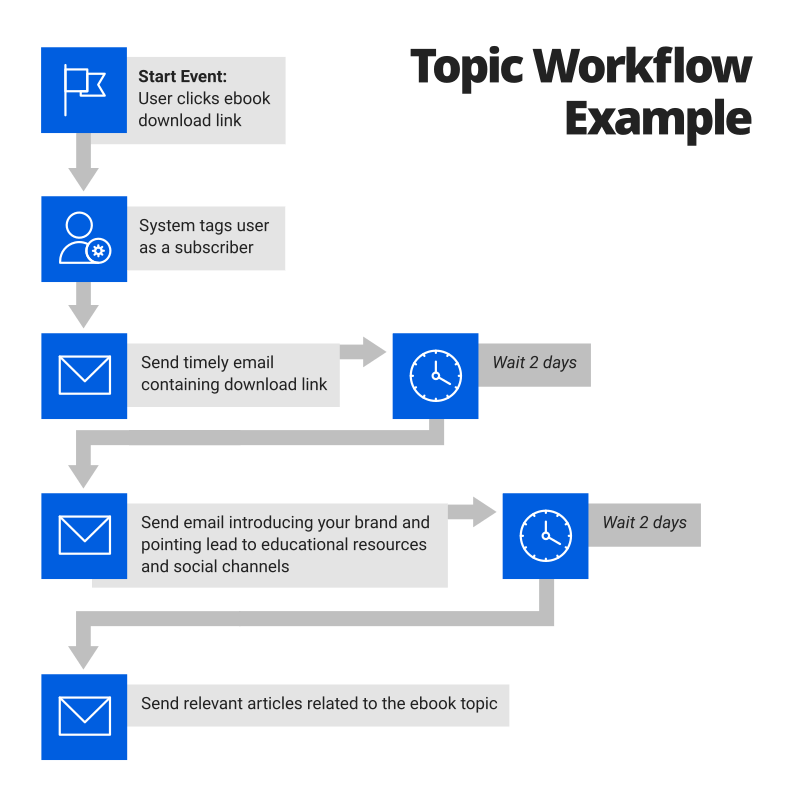
The topic email workflow should provide helpful links that point the contact in the direction of top-performing blog posts, webinars, and upcoming events that are directly related to the topic of the pillar content download or page that kicked off the topic workflow. Each main topic should have a dedicated topic workflow that gradually guides the lead through the customer journey to a relevant solution.
Lead Nurturing Workflow
A lead nurturing workflow will activate based on preset conditions or actions that a contact meets. This workflow relies on lead segmentation, tagging, and scoring to determine both the location of a lead within the sales funnel and their qualification status. Using the information from a lead’s contact profile, the workflow is able to effectively follow up with relevant content to encourage the lead toward conversion.
Workflow triggers: Custom conditions met, sales funnel stage-specific conversion events
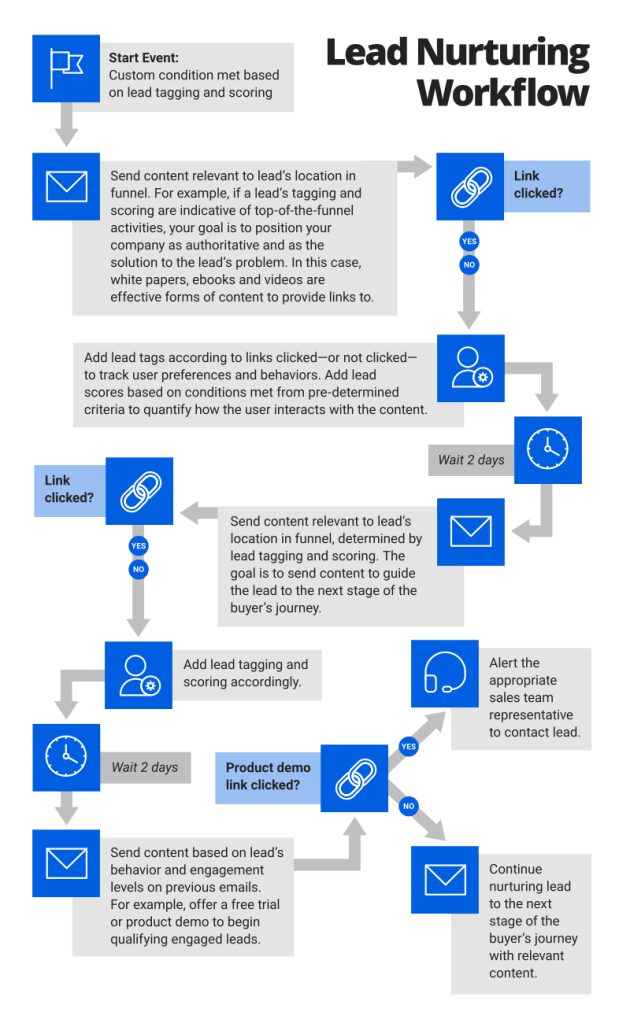
You can use a lead nurturing workflow in conjunction with other workflows. The goals of this workflow are twofold: one, to engage with contacts according to their location in the customer journey; and two, to leverage the data you collect regarding behaviors and preferences in order to address pain points and build trust. Establish your authority and keep your brand top of mind by providing links to helpful blog posts, videos, and other resources that motivate your lead to take next steps.
Lost Opportunity Nurture Workflow
A lost opportunity nurture workflow allows you to launch a series of well-timed emails that inspire a lost qualified sales lead to reconsider and re-engage with your brand. Referring to your CRM database to utilize information on when and where your lead dropped off will give insight into why you lost a lead and the type of content you need to recover the lead and convert them back into a sales opportunity.
Workflow triggers: Lost opportunity notification
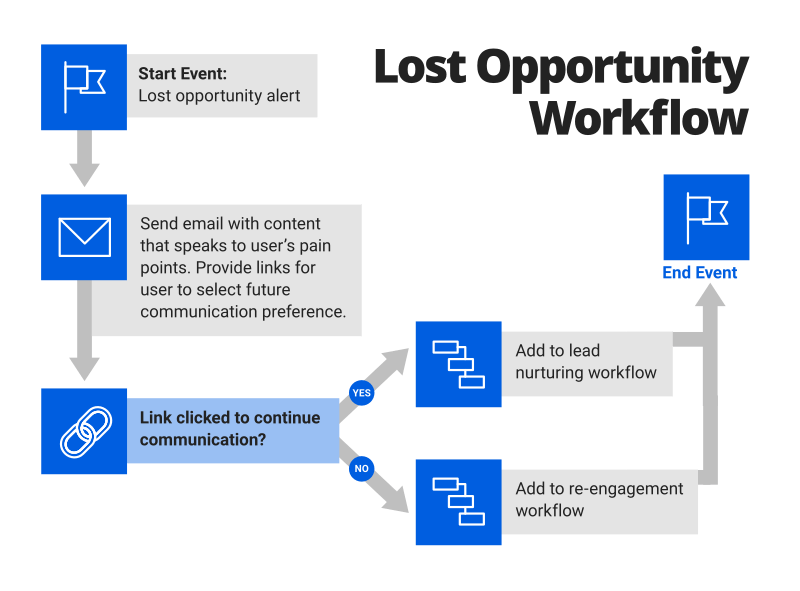
A lead opportunity can be set to “lost” in your CRM database for a number of reasons: The lead may have backed down because of budget constraints, the discovery of alternative solutions, or simply distractions. You launch a lost opportunity nurture workflow to speak to the pain points as they pertain to the lead’s reason for disconnecting from your brand as well as how you plan to help lessen those pain points. For example, if a lead drops off due to budget limitations, ensure your nurture workflow provides special offers and discounts to lure the lead back into the sales cycle. You can also send an email to have the lead make a selection concerning how they want to continue engaging with you.
Customer Engagement Workflow
Use a customer engagement workflow to home in on users with varying levels of product engagement. For instance, for customers who aren’t fully engaging with the product, develop a workflow that provides helpful content, such as how-to videos or tutorials, on unfamiliar product features. For highly engaged users, set up a workflow to request a customer testimonial or featured success story.
Workflow triggers: Performance metric benchmarks, lead scoring, custom conditions met
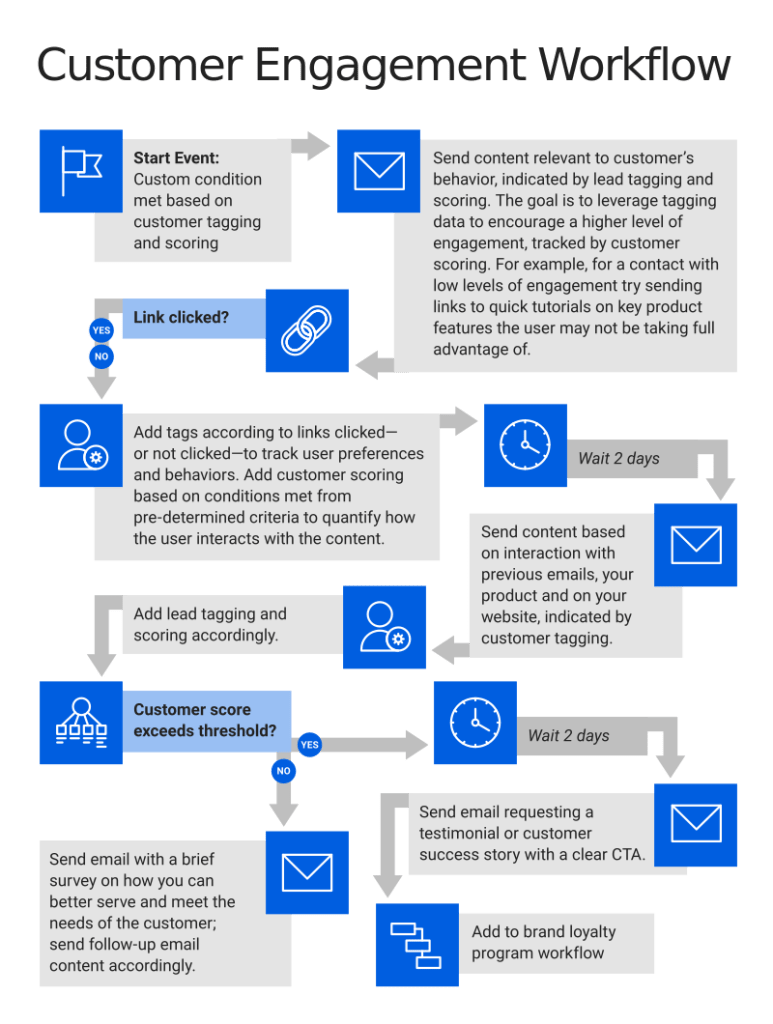
Developing a system to analyze and measure the engagement health of your customers is essential for customer success, and a customer engagement workflow is an integral part of that system. The main goals of this workflow are to guide users to a higher level of engagement and to ensure they are extracting the maximum value from your product.
Buyer Role Segmentation Workflow
A buyer role segmentation workflow launches a string of messages with targeted communication styles that coincide with the specific role of a user within a company. For example, a workflow that you launch to a contact who is a high-level decision maker will offer different information to inform the client’s purchase decision than a workflow that you launch to a product user from the same company, but with no purchasing influence.
Workflow triggers: Role assignment
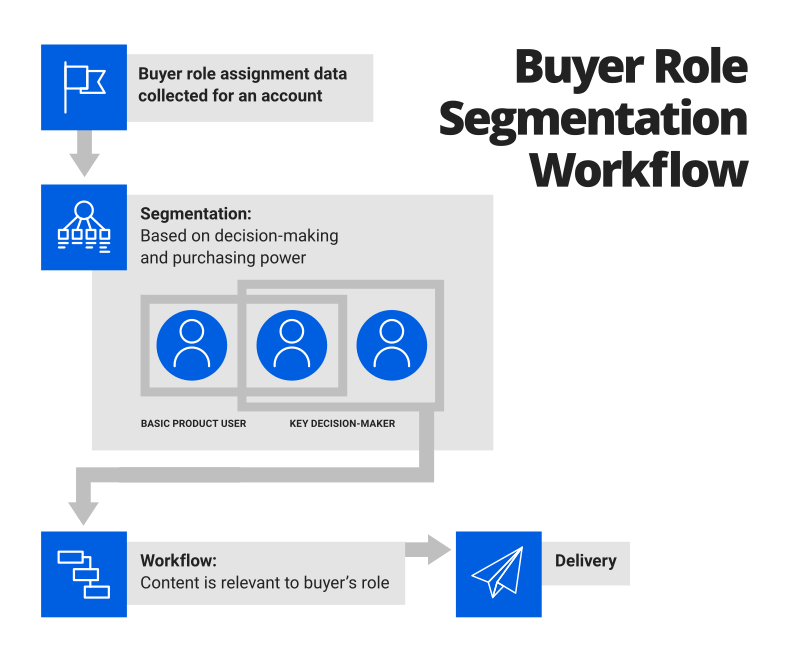
The account representative that manages multiple contacts for a client’s account should assign roles in the database in order to segment those contacts. This role segmentation also allows the sales team to reach out to key decision makers with a relevant communication strategy. The action of the role assignment itself should set the buyer role segmentation workflow in motion to deliver the appropriate content to the right contact, nurturing each one according to their buying influence.
Sales Team Notification of Marketing Qualified Leads (MQLs) Workflow
A sales team notification workflow fires off once a lead is considered marketing qualified, based on established criteria. Prior to building out this workflow, you should develop a lead tagging and scoring plan to qualify leads and communicate that plan to the sales team.
Workflow triggers: Lead tagging and scoring criteria, custom conditions met
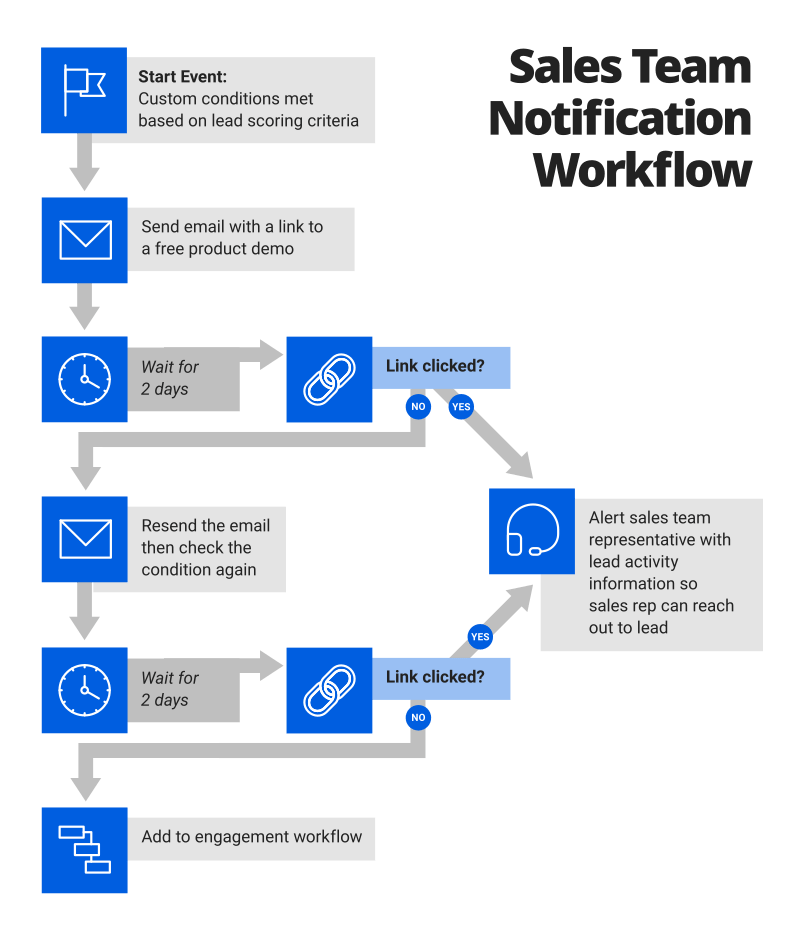
You launch a sales team notification of a marketing qualified leads (MQLs) workflow when a system updates to reflect that a contact’s activities satisfy lead scoring and custom condition requirements. Criteria for qualification can include designated actions like assessing a pricing page, downloading an e-book, or engaging with your content for a set minimum amount of time. The contact activity the system tracks should indicate that a user is beyond the research stage of the funnel and is close to purchasing. The activity should then signal a sales team representative to reach out to the lead directly. The sales rep will now be armed with the lead’s activity information to guide their communication strategy.
Post-Purchase Workflow
A post-purchase workflow should provide a customer with an order confirmation and a sentiment of gratitude for choosing your brand. This workflow should offer referral incentives and encourage users to give feedback on their experience and share their purchase decisions on social platforms.
Workflow triggers: Purchase
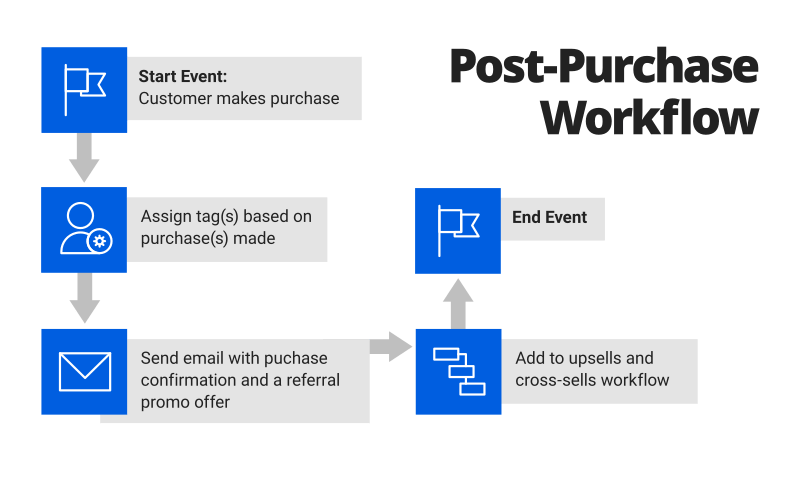
A post-purchase workflow should contain best practices and other useful content to help the user get the most out of their purchase. Customers are already anticipating an email to confirm purchase and order details, so capitalize on this opportunity by inviting customers to engage with your content on various channels.
Upsells and Cross-Sells Workflow
An extension of the post-purchase workflow is the upsells and cross-sells workflow. This workflow might say something along the lines of, “We hope you are enjoying [product purchased]. Consider trying [product recommendations] for [product benefits].” Leveraging the purchase history of a customer while cultivating the relationship not only cuts down on the cost of acquiring new customers, but also increases the lifetime value of existing ones.
Workflow triggers: Purchase history
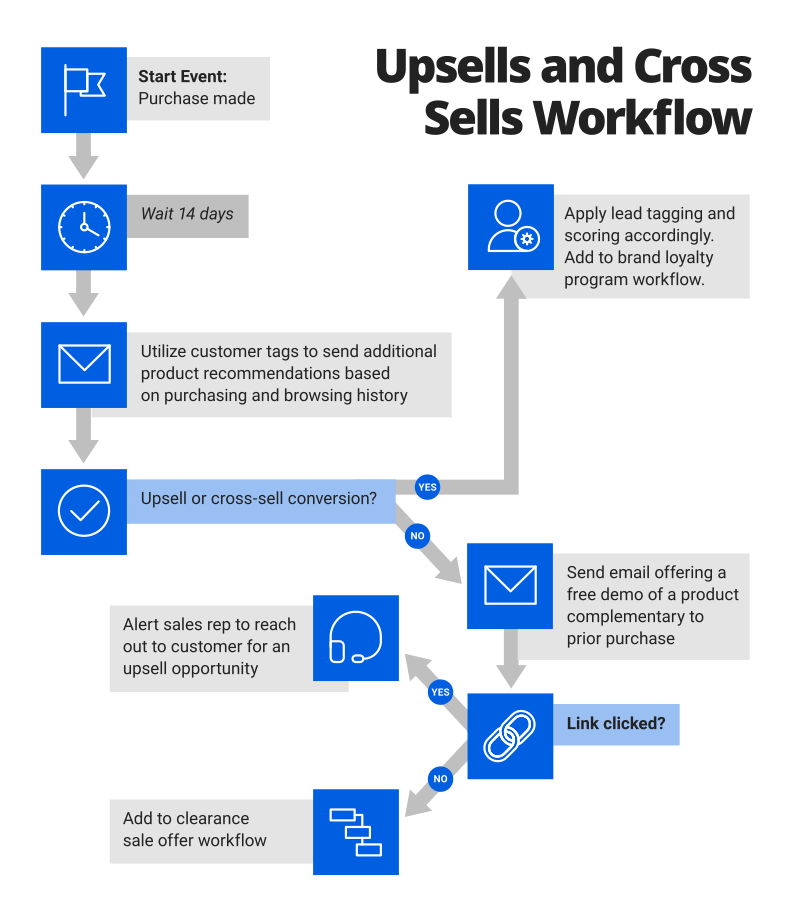
At the core of a successful upsell and cross-sell workflow strategy are a cohesive goal and clear communication between account executives, customer success managers (CSMs), and marketing teams after the deal has closed. The content communicated in the upsells and cross-sells workflow will hinge on the objectives and tactical plan these teams have developed. This workflow serves as an opportunity to offer additional products or complementary products that improve the customer experience while boosting your bottom line.
Replenish or Reorder Prompt Workflow
The replenishment or reorder prompt workflow encourages a new order from customers that are nearing the end of a purchase supply. Some examples of products purchased where a replenishment reminder workflow is advantageous are subscription renewals, items with set monthly supply amounts, or perishable household products.
Workflow triggers: Product lifecycle stage
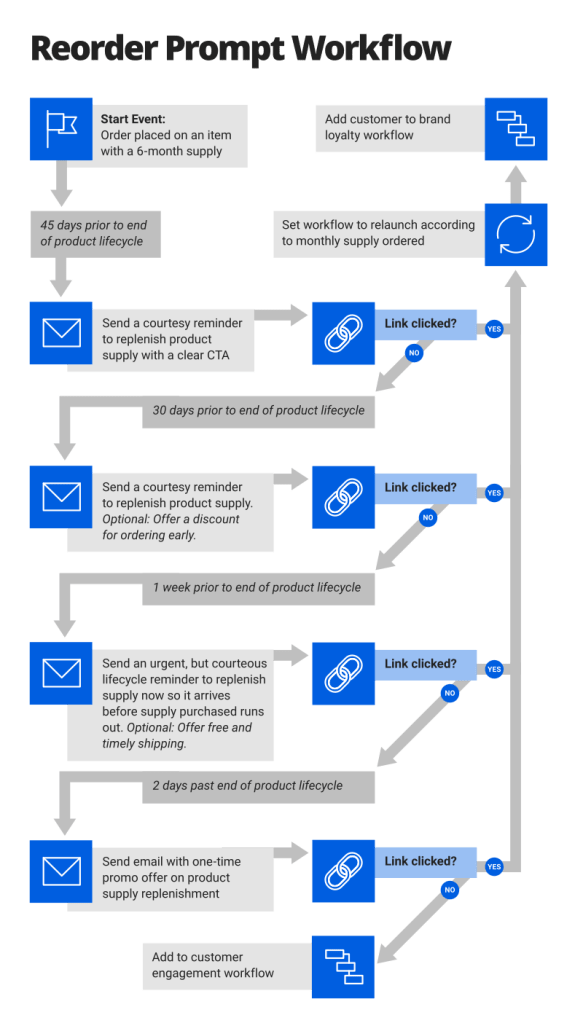
A reorder prompt workflow will launch a friendly reminder to a customer with a link to repurchase a product as it nears the end of its lifecycle stage. The workflow should be proactive and send a prompt that allows enough time for the item reorder to process and ship before the customer’s supply runs out.
Online Shopping Cart Abandonment Workflow
According to Baymard Institute, an average of nearly 70 percent of online customers abandon a cart after adding products to it. Some common reasons for cart abandonment include uncertainty of site credibility, a lengthy checkout process, or that a user is simply browsing and comparing prices.
Workflow triggers: Abandoned Shopping Cart
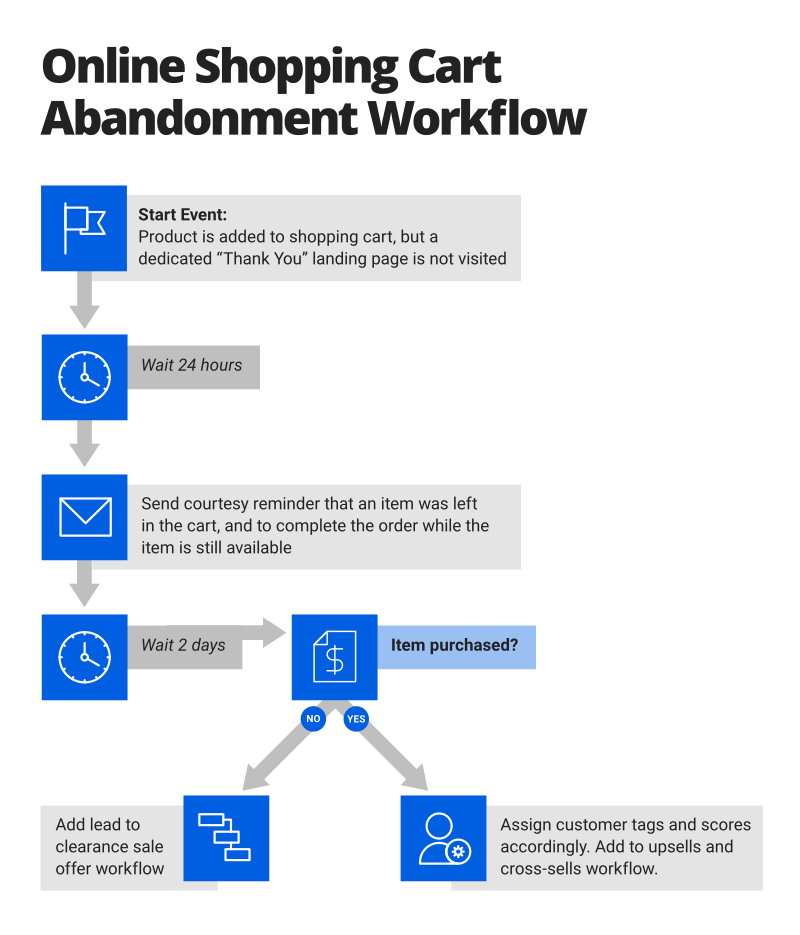
Although ecommerce shopping cart abandonment isn’t always avoidable, a cart abandonment workflow gives you the opportunity to put your brand back in front of a prospect and encourage them to complete the purchase. The workflow launches when a contact lands on a check-out page, but not an order confirmation page, and fails to return after a set amount of time. The workflow serves as a gentle reminder that the items are still available for them and can entice the contact to complete the checkout process by presenting a special offer or limited time discount. Once the lead follows through with the purchase, they should then be added to an upsell workflow, replenishment prompt workflow, and any other applicable workflow aimed to retain the customer.
Re-engage with Dormant Users Workflow
Get inactive contacts excited about your brand again with a re-engagement workflow that launches once a lead has met — or failed to meet — certain conditions. Custom conditions for entry into this workflow include a period of time that has passed since a contact last submitted a form, visited your website, opened an email or engaged with your content after a free trial expiration.
Workflow triggers: Engagement conditions not met in a specified length of time
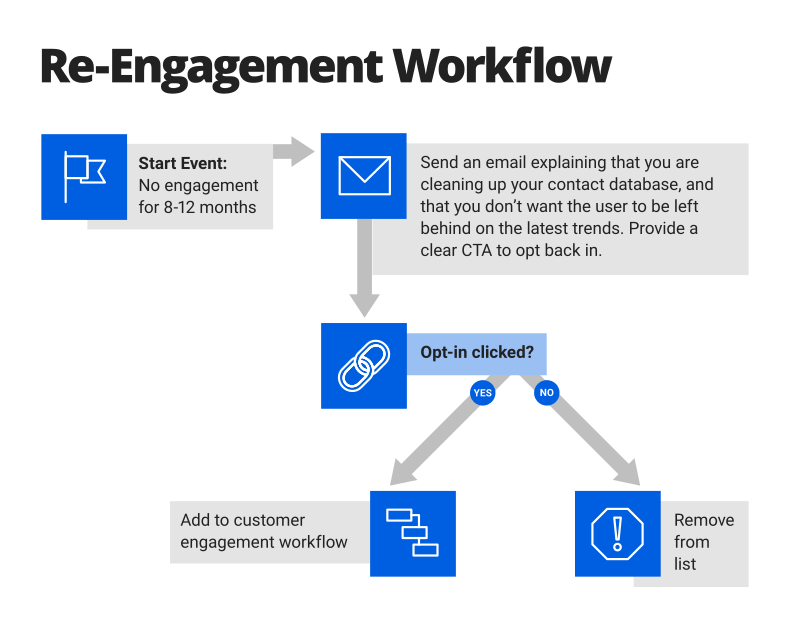
Contacts in your email database can disengage with your brand for a variety of reasons, and those reasons aren’t always preventable. A re-engagement workflow uses historical data collected on a contact to attempt to rekindle the relationship and nurture them back into the customer journey using special offers, exclusive content, or even a brief survey to learn how you can better meet their needs. It is essential to determine what length of time will pass before a contact is defined as inactive, and that time period will vary depending on your business model. If a lead remains dormant even after the re-engagement workflow is launched, it may be time to remove that contact from your list altogether to avoid SPAM complaints and to improve key email engagement metrics.
Clearance Sale Offer Workflow
The clearance sale offer workflow presents special discounts and limited time offers according to a customer’s purchasing and browsing history. If a lead fails to convert in an upsells and add-ons workflow, a clearance sale offer workflow gives you another opportunity to follow-up with relevant, time-sensitive content to encourage a lead to convert.
Workflow triggers: Contact purchase history, browsing history with no conversion, upsells and add-ons workflow with no conversion
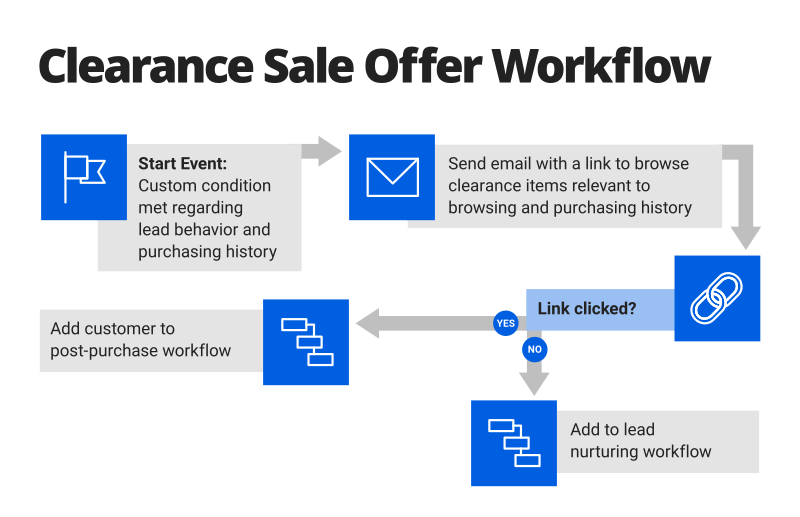
The event that triggers your clearance sale offer workflow will depend on how your leads are segmented based on past purchases and browsing behaviors. For example, a lead that engages with a product page for a set length of time and clicks on certain products will kick off a clearance offer workflow for the respective products, guiding the lead from the consideration phase to the decision stage of the customer journey.
Customer Satisfaction Workflow
The customer satisfaction workflow is set in motion based on satisfaction survey results and feedback gathered from your customer base. Establish criteria for user satisfaction scoring levels, and then assign a tag to the user based on that criteria. The customer will then be segmented according to his or her satisfaction level tag, enabling you to assign them to a workflow with content aimed to move them to a higher rate of contentment by catering to their pain points.
Workflow triggers: Survey satisfaction metrics
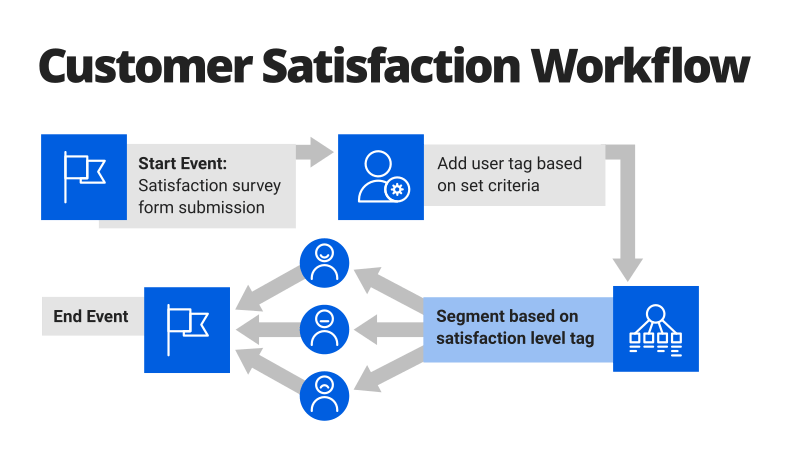
Quantify how satisfied your customers are with your brand on a numerical scale, and then set out to improve that satisfaction level with a customer satisfaction workflow. For example, customers with low satisfaction scores can receive relevant content and helpful resources to improve their experience, while customers with high satisfaction scores can be rewarded with special offers or referral perks.
Brand Loyalty Program Workflow
Leverage users with high brand interaction rates, such as clicks, comments, and purchases to encourage social sharing and featured success stories in exchange for special perks. Set conditions based on predetermined criteria of what represents a high level of engagement prior to building out your workflow strategy.
Workflow triggers: High engagement conditions met, lead tagging and scoring criteria
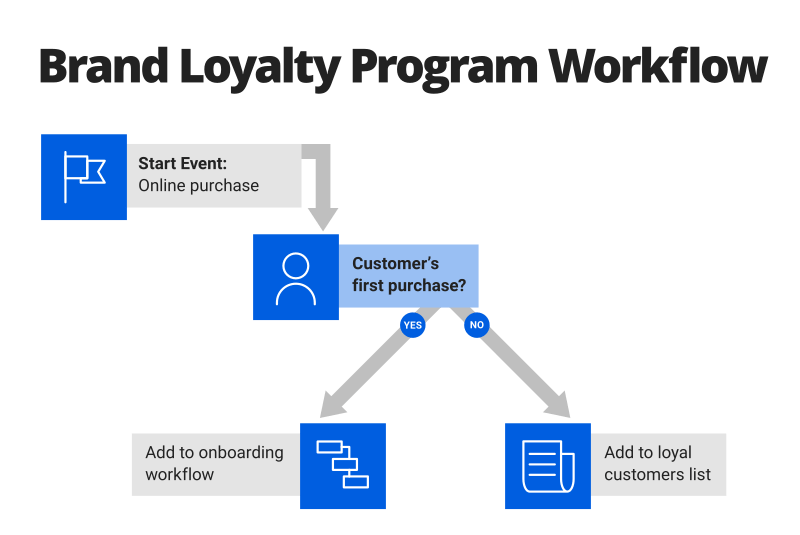
A brand loyalty program workflow allows you to incentivize contacts to continue engaging with your brand by issuing loyalty points that can be redeemed for special offers or exclusive content aimed to increase the lifetime value of the customer. You can also use highly engaged contacts to your advantage by requesting feedback and product reviews to gain valuable insight for product enhancement.
Email Course Lesson Series Workflow
An email course lesson series is a drip campaign workflow that educates leads on an industry-specific topic that is determined based on top-performing blog posts or content pillars. A workflow should be built out according to the strategic goals and objectives of the email campaign plan.
Workflow triggers: Form submission opt-in, dedicated landing page
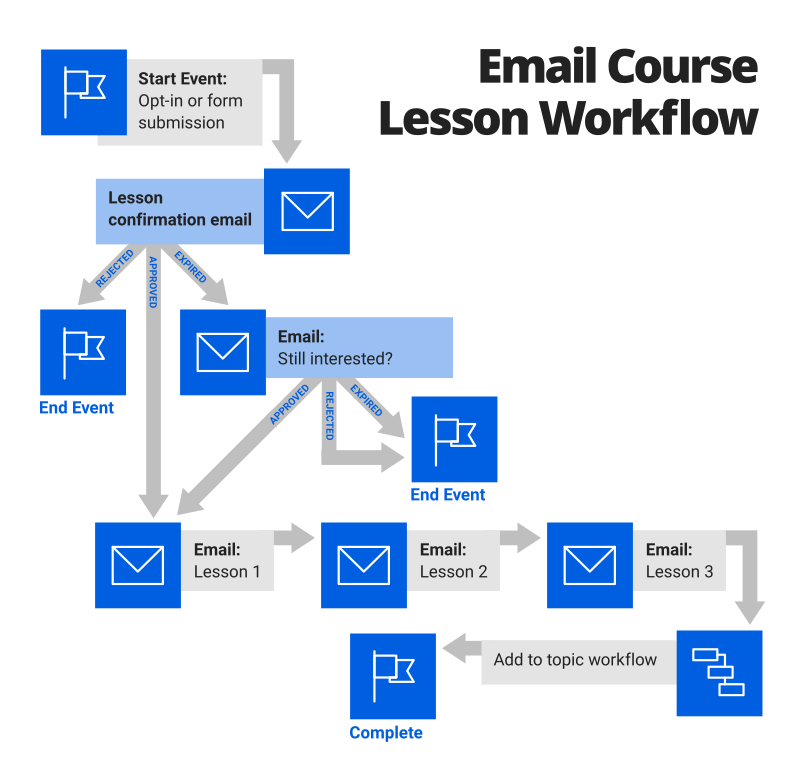
A typical email course lesson series workflow contains between five and 10 email lessons (the total amount depends on the course topic and target audience). The workflow immediately launches the first email to provide confirmation details, a course overview, and what to expect in the coming days or weeks. Use your campaign plan to decide which lesson(s) to strategically place the sales pitch. At the completion of the workflow, the contact is added to another workflow based on how they engaged with the course lesson series workflow. For example, if a lead makes a purchase, consider enrolling them in the upsells and add-ons workflow. If a lead does not convert, consider a topic or lead nurturing workflow to guide them down the sales funnel.
Email Workflow Best Practices
The process of planning, launching, and managing your automated email workflow includes a lot of moving parts. The following best practices are grouped by category to help ensure that each aspect of your email workflow delivers optimal results:


 Marketing Unplugged
Leave a Reply